

Growing businesses in Georgetown can lose productive hours when aging technology cannot keep pace with sales, staffing, or customer expectations. A technology roadmap for small business turns those risks into a sequenced 12-month plan, so leaders can prioritize security, replacements, and growth without waiting for an emergency.
Schedule a 15-minute call with Computek to start your technology roadmap.
A technology roadmap for small business is a prioritized plan that connects IT decisions to business goals. It documents current systems and risks, sequences improvements, assigns owners, and forecasts budget categories. Leaders use it to replace aging tools before failure, strengthen security, and prepare technology for hiring, new locations, or changing customer needs.
What is a technology roadmap for small business?
Many small business owners in Georgetown see tech as a cost and only think about IT when a server breaks. But a real technology roadmap for small business is more than that. It is a long plan that matches your tools with your business goals. It looks ahead one to three years to make sure your systems help you grow instead of holding you back.
A strategic plan for your IT goals
A roadmap is like a map for your business tech that shows where you are now and where you want to go. It lists the tools you need and what they will cost and shows when you will set them up. This plan helps you avoid big costs that can hurt your bank account while keeping your systems up to date. By using expert IT consulting, you can build a path that works for your team.
The best plans focus on three main areas:
- Safety: Keeping your data safe from hacks.
- Speed: Helping your team work faster without IT stops.
- Growth: Choosing tools that scale as you add clients.
A roadmap helps you find gaps in your setup before they cause big trouble. It turns your tech from a source of stress into a tool for success.
Why a roadmap is not just a wish list
It is easy to make a list of new tools you want to buy, but a roadmap is more than an IT wish list. A wish list is about what you want, but a roadmap is about what your business needs to win. It includes clear goals and a timeline for each step while naming who owns each task. This makes sure the work gets done and the tools are used well.
A good plan also looks at risk, which is vital for firms in North Austin that handle client data. The NIST Cybersecurity Framework shows that finding risks early is the best way to stay safe. A roadmap includes steps to fix old systems that might be open to hacks. It moves you from a reactive way of working to a proactive one.
Building a path for future growth
Your tech should scale as your business grows and your network must be ready for new staff. A roadmap helps you choose tools that grow with you so you do not have to replace your whole system every two years. It gives you a clear view of future costs so you can plan your budget with ease. This path removes the fear of high IT costs.
This plan also helps stop staff from using their own tools when office tools do not work well. A roadmap makes sure your team has what they need from the start so they do not use their own unsafe tools. It keeps your data in one safe place and helps everyone work together. With a clear path, you can focus on your clients while your tech handles the rest.
Start with an honest assessment of current systems
Building a technology roadmap for small business starts with a clear look at what you have now. You cannot plan for next year if you do not know what gear you own today. Many owners in Georgetown find that their tech grew bit by bit. This often leads to a mix of old and new tools that do not work well together. A full check helps you find gaps and risks before they stop your work.
Inventory your hardware and software assets
A good check covers every part of your office. You should list all tools and apps your team uses each day. This step ensures that no part of your firm is left behind as you grow. Most small firms have more tech than they think. You might find old laptops in a closet or cloud apps that you still pay for but never use.
You must track the age and health of every server and laptop. Most gear lasts three to five years before it starts to fail or slow down. Knowing when your tools will wear out helps you plan your budget. It also prevents the shock of a sudden crash. You should also check your software to make sure your rights to use it are up to date.
Evaluate safety and backup measures
Safety is a key part of any IT plan. You must check how you store data and who can see it. Many firms find that their cybersecurity is not as strong as they thought. You should check your firewall and look for gaps in your safety tools. It is also wise to see if your team uses extra login steps to keep your data safe.
Data backup is your last line of shield against a hack. You need to know if your backups run every day and if they are kept in a safe spot. Testing your plan now saves you from a bad day later. You do not want to find out that your data is gone after a disk fails or a virus hits your desk. A solid plan gives you the peace of mind to focus on your work.
Check connectivity and business links
Next, look at how your firm depends on certain tech tools. Some apps are more vital than others for your daily tasks. If your email or phone system goes down, can you still serve your clients? Finding these links helps you decide which new tools to buy first. You should also check your web speed to see if it meets your team’s needs.
This step is where you link your tech to your goals. If you plan to add more staff, your current network may not handle the load. You should also look at your managed IT services deals. Make sure your vendors give you the help you need at a fair price. This process turns a long list of needs into a smart plan.
Use this simple checklist to start your review:
- List all laptops, servers, and tools.
- Audit software apps and monthly cloud costs.
- Test data backup and recovery speed.
- Review how well your internet and phone work.
- Check firewall and antivirus status.
How should you prioritize technology risks and investments?
Most small business owners face a long list of tech needs but work with a tight budget. You cannot fix every old server or buy every new software tool at the same time. To keep your firm running well, you must choose which tasks matter most. A clear technology roadmap for small business helps you focus your time and money on the most vital goals first.
Find your high-risk gaps first
Start by looking at what keeps your doors open. Think about your data, your tools, and your team. If a system goes down, how much money do you lose each hour? If your client data is stolen, how much trust do you lose? High-risk areas like business cybersecurity must come first in your plan. These are the “must-haves” that protect your hard work from big threats like hacks or data loss.
You can use a simple grid to see where you stand. Put each risk in a box based on how likely it is to happen and how much it will hurt your work. The NIST Cybersecurity Framework shows that finding and managing these risks is the first step to a strong tech plan. This method lets you see which gaps to fill now and which ones can wait for a few months. It removes the guesswork from your IT spending.
Match tech spending with your growth
Your tech plan should not just be about fixing what is broken. It should also help you grow. If a new tool helps your team work faster or sell more, it might be worth the cost. Look for tools that scale as you add more staff or customers. This way, you do not have to buy new systems every two years. Good tech should grow with you, not hold you back.
Check how much work each project needs. Some changes are quick and cheap but offer big wins. Others take months and cost a lot of money. By mapping these out, you can mix short-term wins with long-term goals. This keeps your team happy and your bank account in check. It also makes sure your tech supports your business goals in Georgetown or Round Rock.
Compare your priority levels
Use the table below to sort your tech needs into four groups. This helps you decide what to do today and what to save for next year. It makes your plan much easier for your team to follow.
| Priority | What It Means | Best Response |
|---|---|---|
| Critical | Stops work or puts data at risk. | Fix this right away. |
| High | Boosts sales or saves much time. | Add to your current budget. |
| Medium | Makes daily work a bit easier. | Plan for next year’s budget. |
| Low | Small gains with a high cost. | Wait and check back later. |
By using this simple system, you turn a scary list of tech tasks into a smart plan. You spend less time worrying about tech and more time serving your clients. This path gives you the peace of mind that your tech is ready for whatever comes next.
Talk with Computek about sequencing your highest-priority technology investments.
A practical 12-month technology roadmap framework
A 12-month tech plan helps your shop avoid costly stalls. It gives you a clear path for new gear and software. Instead of reacting to a broken server, you can plan for it. This way, your team stays online and your budget stays flat. A solid IT consulting plan links your tech buys to your big goals. This path ensures every cent you spend helps your firm grow in Round Rock or Austin.
Secure your core assets in the first quarter
The first three months focus on safety and facts. You must know what you have before you can change it. Most firms have old gear or apps they no longer use. Clearing these out makes your shop faster and safer. You also need to find and fix any security gaps right away. Starting with a cybersecurity audit is the best first step. This gives you a safe base for the rest of your year.
Update your tools for better work
Once your base is safe, you can look at growth. Quarters two and three are for new gear and training. This is when you swap out old PCs and move files to the cloud. You want tools that help your team work well from any place. If your staff struggles with slow apps, their work will slow down too. Buying new tech in small steps keeps your costs from spiking all at once. It also gives your team time to learn each new tool.
- Audit and secure your base. Start by listing every piece of gear and software your team uses today. You must find old tools that might put your data at risk or slow down your network.
- Fix high-risk security gaps. Use your first wins to patch known holes in your defense and set up strong logins. This first step stops hackers from hitting your shop while you work on other tasks.
- Cycle out old hardware. Plan to swap out PCs or servers that are more than four or five years old. Doing this in the middle of the year keeps your shop running at top speed.
- Move key tasks to the cloud. Shift your files or apps to cloud systems to help your staff work from home or on the road. This step makes your team more flexible and keeps your data safe from local site loss.
- Train your staff on new tech. Give your team time to learn each new tool so they can use it well. Good training stops work stalls and makes sure you get the most from your tech buy.
- Review and set your next budget. Look at what worked well and where you still have gaps at the end of the year. Use these facts to set a smart plan and budget for the next 12 months.
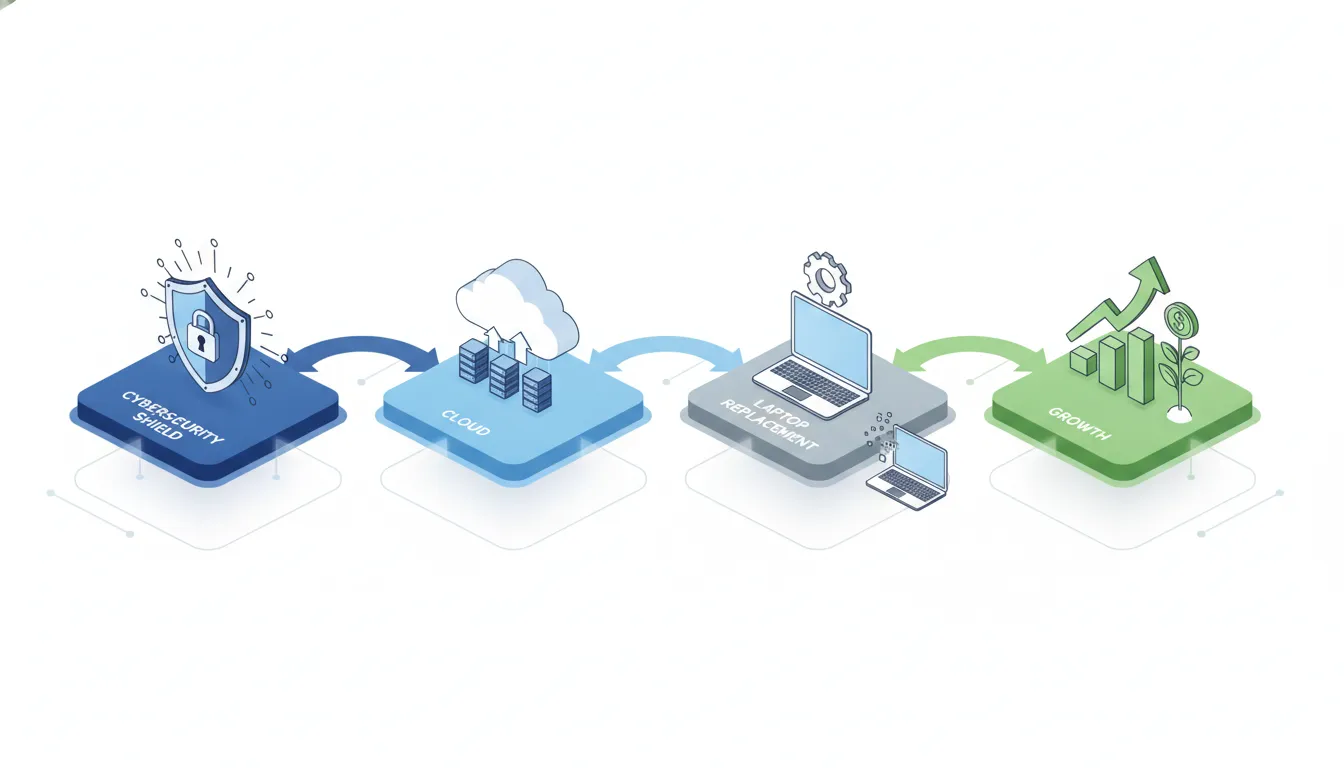
Check your progress and plan ahead
The final three months are for checking your wins. You should look at your budget and see if you stayed on track. Most shops find they need to tweak their plan based on new tech or growth. This is the time to ask your staff how the new tools are working. Their feedback will help you build a better plan for next year. Proactive managed IT services keep this cycle moving without stress. This check makes sure you are ready for whatever the next year brings.
How to budget for replacements and improvements
A roadmap gives leadership a better budgeting method than responding to failures one invoice at a time. It does not require predicting an exact cost for every project. Instead, it creates visibility into likely spending categories, decision windows, and the business reasons behind each investment.
Separate recurring costs from project costs
Start by grouping current and proposed expenses. Recurring costs may include software subscriptions, connectivity, support, cloud services, security tools, and backup. Project costs may include device replacements, migrations, network upgrades, office expansions, and professional services. Keeping these categories separate makes it easier to see the ongoing operating impact after a project is complete.
Plan around lifecycle and business timing
Document the expected replacement window for critical equipment and the renewal dates for important contracts. Then compare those dates with seasonal workload, planned hiring, location changes, and other business initiatives. A replacement that is manageable during a slower quarter could be disruptive during a peak production period.
Build a reasonable contingency for unexpected failures or urgent security work. The roadmap should reserve flexibility without becoming a blank check. Leadership can revisit the contingency during quarterly reviews and adjust it as risks become clearer.
Evaluate total cost and expected outcome
The purchase price is only one part of a technology decision. Consider implementation, training, support, maintenance, integration, downtime, and the staff time required to operate the solution. Compare that total cost with a defined business outcome, such as reducing operational interruptions, supporting new employees, protecting critical data, or improving a customer-facing workflow.
For each planned investment, record a budget category, decision deadline, responsible owner, and approval criteria. This approach gives leaders enough structure to make informed decisions while allowing scope and cost estimates to improve as the project moves closer.
Keep the roadmap aligned with business growth
A technology roadmap for small business is not a fixed list. It must change as your firm grows. To keep it on track, you need a strong way to manage it. This means picking a lead person to watch the plan and check on it often. Without a clear owner, even a great plan can fall behind and stop helping your team.
Pick a leader for your tech plan
One person in your firm should own the tech roadmap. This owner does not need to be a deep tech expert. They just need to know your business goals and how you work. They will track each tech project and see what needs to happen next. Having one lead person makes it easy to get quick updates on your progress. You can find out more about this by using IT consulting for your local office.
The owner also talks to your staff to get feedback. They find out if the new tools really help people do their jobs. If a new tool is too slow or hard to use, the owner can find a fix. They make sure your tech stays tied to your daily work. This keeps the whole team on the same page as you scale up. A clear owner keeps the plan alive and keeps the team happy.
Set clear goals and track results
You must set clear marks for success in your plan. These are called key marks or KPIs. They show you if the tech is worth the cost. For one, you might track how much time a new tool saves each week. Or you could see if your site is faster for clients. Clear goals help you see if you are moving in the right way. This helps you make smart choices for your next tech buy.
Tracking results also helps you find weak spots. If a project costs too much, you can stop or change it. This saves you money in the long run. Good tracking means you don’t just spend money on tools. You invest in things that help your firm win. Checking these marks every month gives you the data you need to grow with ease.
Review the plan every quarter
You should check your plan at least every three months. Business moves fast, and your tech needs to keep up. During these checks, look at what you have done and what is left. The NIST Cybersecurity Framework shows that set reviews help manage risks as you grow. This keeps your data safe while you add new staff or tools. Frequent checks keep your tech safe and strong.
Big changes in your firm also need a quick plan update. If you hire ten new people or open a new office in Round Rock, look at your roadmap. You might need more cloud storage or better safety. Proactive managed IT services can help you stay ahead of these needs. By updating the plan after each big change, you make sure your tech always supports your growth. This keeps your firm ready for any new challenge.

Schedule a 15-minute call to turn your technology priorities into an actionable roadmap.
Frequently asked questions
How often should a small business update its technology roadmap?
Review the roadmap at least quarterly and after a major change, such as opening a location, adding a new business system, hiring rapidly, or experiencing a security incident. A quarterly review keeps priorities, owners, dependencies, and budgets aligned with current business conditions.
Who should own the technology roadmap?
An executive sponsor should own the business outcomes, while an internal operations leader or trusted IT advisor manages the technical details. Department leaders should contribute requirements because technology choices affect workflows, customer service, security, and growth across the company.
What should be included in a technology roadmap for small business?
Include current systems, risks, business goals, prioritized initiatives, owners, dependencies, target timeframes, replacement cycles, budget categories, and success measures. The roadmap should also document assumptions so leaders can update decisions when the business changes.
How far ahead should a small business technology roadmap plan?
A 12-month plan is detailed enough to guide near-term action while remaining flexible. It can sit within a broader two- or three-year direction, but longer-range items should stay adaptable because business priorities, security threats, and vendor options change.
Build a practical technology roadmap with Computek
A useful roadmap turns technology decisions into a clear business plan. Computek helps Central Texas owners and operations leaders assess current systems, prioritize risks, and sequence improvements around growth goals. If your team has limited internal IT resources, get an experienced perspective before the next urgent replacement or security problem forces the decision.