

More than 90 percent of businesses already use some form of cloud computing, yet many small business owners still wonder if the cloud is the right move for their company. If your team relies on email, shared files, or any web-based application, you are probably using cloud services already and may not even realize it. The real question is whether you are getting the full value the cloud can deliver.
This guide breaks down everything a small business owner needs to know about cloud computing, from the different types of cloud services to how a well-planned migration can save money, boost team productivity, and strengthen your security posture. Whether your business is in Georgetown, Round Rock, or the greater Austin area, this resource will help you make a confident, informed decision about your next technology move.
Key Takeaways
- Cloud computing lets small businesses access enterprise-level technology without the upfront cost of building and maintaining their own servers.
- The three main cloud service types (IaaS, PaaS, and SaaS) serve different business needs. Knowing the difference helps you choose the right solutions.
- A structured cloud migration plan reduces risk and downtime while protecting your data.
- Hybrid cloud strategies give businesses flexibility by keeping some data on-site while leveraging cloud resources for collaboration and scalability.
- Working with a local managed IT provider ensures your cloud transition is planned around your specific operations, budget, and growth goals.
Ready to explore cloud solutions for your business? Schedule a free 15-minute call to discuss your needs with our team.
What Is Cloud Computing and Why Does It Matter for Small Businesses?
Cloud computing is the delivery of computing services over the internet instead of from hardware sitting in your office. Rather than buying, installing, and maintaining physical servers, your business rents access to storage, processing power, and software from a provider that manages the infrastructure for you.
For small businesses, this changes the economics of technology. Instead of a large capital investment in server rooms, cooling systems, and IT staff to keep it all running, you pay a predictable monthly fee for exactly the resources you need. As your business grows, your cloud services scale with you.
This shift has been significant across Central Texas. Businesses in Georgetown, Round Rock, and Austin that once needed dedicated server closets now run their entire operations from cloud platforms. The result is lower overhead, faster access to new tools, and the ability to compete with much larger companies on a level playing field.
Cloud services from Computek include complete cloud infrastructure, data storage, hybrid cloud options, and cloud applications designed to help your team work smarter.
Understanding the Three Types of Cloud Services: IaaS, PaaS, and SaaS
Not all cloud services work the same way. There are three main categories, and each one serves a different purpose in your business.
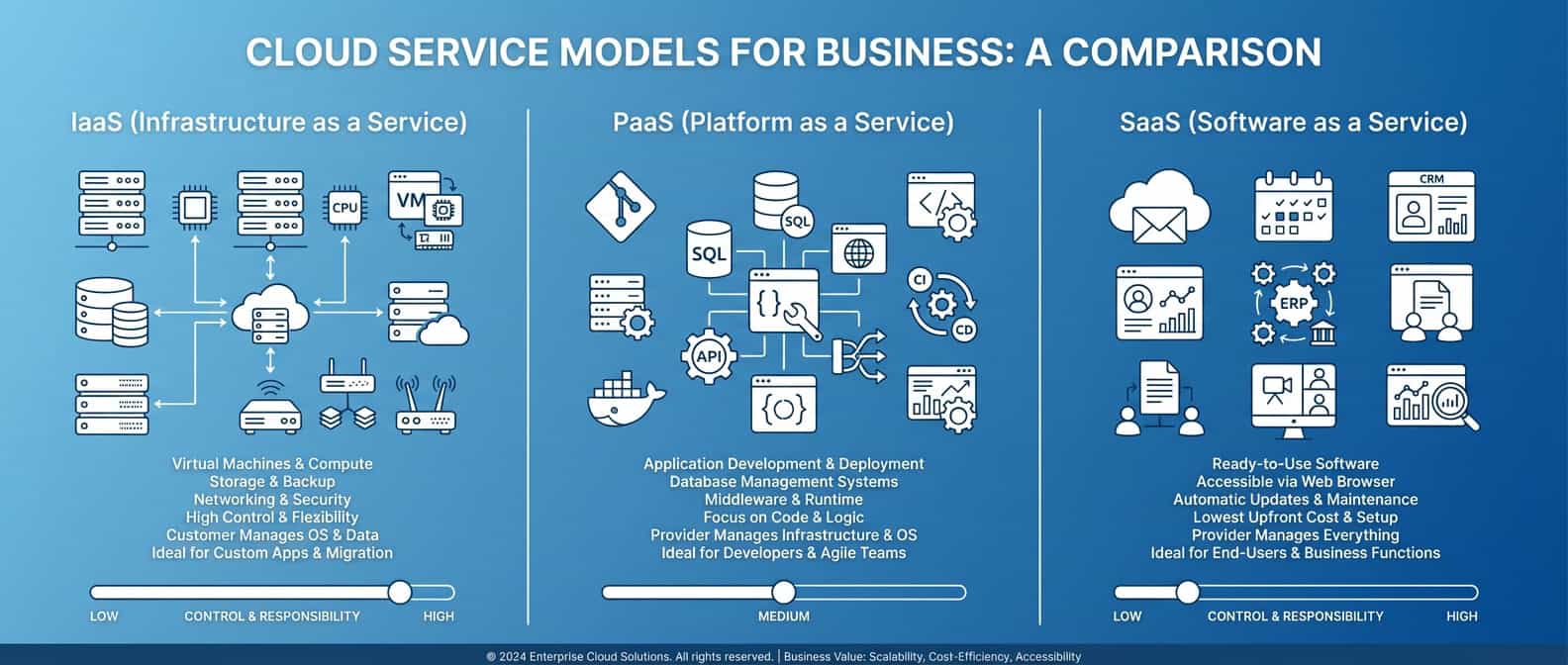
Infrastructure as a Service (IaaS)
IaaS provides the foundational building blocks of your IT environment: networks, servers, data storage, and virtualization. Think of it as renting a fully equipped data center without owning the physical equipment.
Best for: Businesses that need flexible computing resources, virtual servers, or scalable storage without managing hardware.
Common examples: Cloud-hosted servers, virtual desktops, cloud-based data storage.
Platform as a Service (PaaS)
PaaS offers a cloud-based platform that multiple users can share to create a cohesive workspace. It provides the tools and environment your team needs to build, test, and deploy applications without worrying about the underlying infrastructure.
Best for: Businesses that develop custom applications or need shared development environments.
Common examples: Cloud-based development platforms, database management services, business analytics tools.
Software as a Service (SaaS)
SaaS refers to web or mobile applications you access through the internet rather than installing on individual computers. If you use Microsoft 365, Dropbox, or QuickBooks Online, you are already using SaaS.
Best for: Businesses that want ready-to-use software with no installation, automatic updates, and access from any device.
Common examples: Microsoft 365, Google Workspace, accounting software, customer relationship management tools.
Most small businesses use a combination of all three. For example, a construction company in Round Rock might use IaaS for secure file storage, PaaS for project collaboration, and SaaS tools like Microsoft 365 for daily communication.
Five Benefits of Cloud Computing for Small Businesses
Research shows that 78 percent of employees report that using the cloud has made them more productive. Here are the specific advantages that matter most for growing businesses.
1. Lower Upfront Costs and Predictable Spending
Traditional IT infrastructure requires significant capital investment. Servers, networking equipment, software licenses, cooling systems, and dedicated space all add up before you even factor in the IT staff to manage them.
Cloud computing replaces those large upfront costs with a monthly operating expense. You pay for what you use, and you can adjust your plan as your needs change. This predictable spending model makes budgeting easier and frees up capital for other business priorities.
2. Work from Anywhere with Real-Time Collaboration
Cloud platforms let your team access files, applications, and company data from any location with an internet connection. Employees in the office, working remotely, or visiting a job site can all collaborate on the same documents in real time.
This flexibility has become essential for businesses across the Austin metro area, where teams often work across multiple locations. Whether your staff splits time between a Georgetown office and project sites in Cedar Park, cloud access keeps everyone connected and productive.
3. Scalability That Grows with Your Business
Adding a new employee used to mean buying another workstation license, setting up email, and possibly upgrading your server capacity. With cloud services, adding a new user is often as simple as setting up an account.
As your business grows from 10 employees to 50, your cloud environment grows with you. No emergency hardware purchases, no capacity planning headaches. This scalability is one of the biggest reasons small businesses are making the switch.
4. Stronger Security and Compliance
Many business owners worry that moving data to the cloud means losing control over security. In reality, reputable cloud services invest heavily in security measures that most small businesses could never afford on their own, including encryption, multi-factor authentication, automated backups, and 24/7 monitoring.
For businesses in regulated industries like accounting, legal services, and healthcare, cloud providers also offer compliance frameworks that help you meet industry requirements without building those capabilities in-house.
Pairing cloud services with a strong cybersecurity strategy gives your business multiple layers of protection against ransomware, data breaches, and other threats.
5. Built-In Disaster Recovery
If a server fails, a pipe bursts in your office, or a storm knocks out power, locally stored data can be lost or inaccessible for days. Cloud services store your data across multiple secure locations, so a local event does not mean a business disruption.
This built-in redundancy works alongside a formal data backup and recovery plan to keep your business operational no matter what happens at your physical location.
Want to protect your business with reliable cloud services? Schedule a free 15-minute call with our Central Texas cloud experts.
How to Plan a Cloud Migration Without Disrupting Your Business
Moving to the cloud does not have to be an all-or-nothing leap. A phased, well-planned migration protects your data and minimizes disruption to your daily operations.
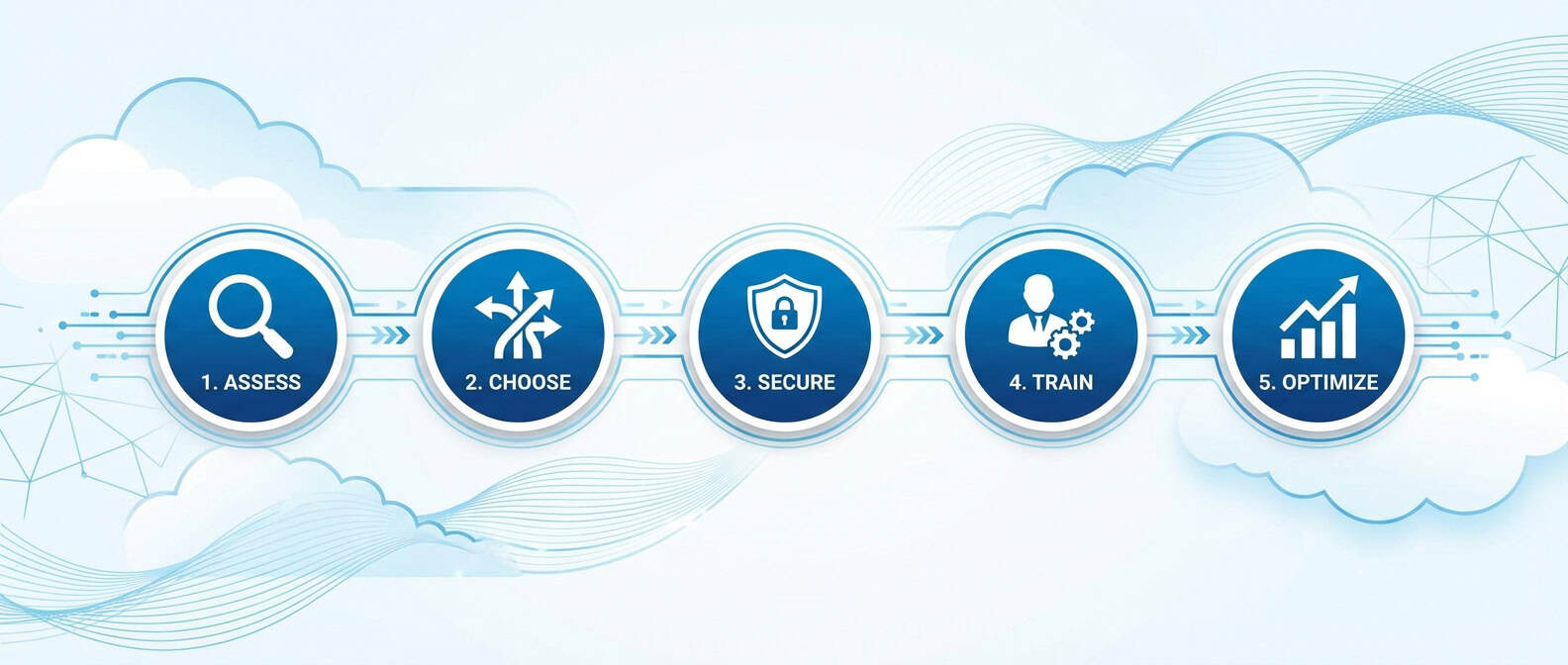
Step 1: Assess Your Current IT Environment
Start by documenting what you have today. What servers are you running? What software does your team use daily? Where is your data stored? Understanding your current state is the foundation for a smart migration plan.
A professional IT consulting assessment can identify which systems are ready to move, which need upgrades first, and which should stay on-premise.
Step 2: Choose the Right Cloud Model
Not everything needs to move to the cloud at once, and some systems may work better on-premise. This is where a hybrid cloud approach comes in.
Hybrid cloud combines on-premise infrastructure with cloud resources, giving you the flexibility to keep sensitive data locally while using the cloud for collaboration, email, storage, and applications that benefit from anywhere access.
Many businesses in Georgetown and Round Rock start with a hybrid approach, moving email and file storage to the cloud first, then gradually shifting additional workloads as they see the benefits.
Step 3: Secure Your Data Before, During, and After Migration
Data security during migration is critical. Before moving anything, ensure you have a complete backup of all systems. During migration, data should be encrypted in transit. After migration, verify that all files transferred correctly and that access permissions are properly configured.
Having a cyber threat protection strategy in place before you migrate adds an extra layer of confidence to the process.
Step 4: Train Your Team
The best cloud setup in the world falls flat if your team does not know how to use it. Plan training sessions so employees understand how to access their files, collaborate on shared documents, and follow security best practices like strong passwords and multi-factor authentication.
Step 5: Monitor and Optimize
Cloud migration is not a one-time project. After the initial move, monitor performance, review costs, and adjust your setup as your business evolves. A managed IT provider handles this ongoing optimization so you can focus on running your business.
Hybrid Cloud: The Flexible Option for Growing Businesses
Many small businesses find that hybrid cloud is the sweet spot between fully on-premise and fully cloud-based infrastructure. A hybrid approach lets you keep certain workloads and sensitive data on local servers while taking advantage of cloud scalability, collaboration tools, and disaster recovery.
This approach is especially popular among Central Texas businesses in manufacturing, construction, and property management where certain specialized applications run better on local hardware, but the rest of the business benefits from cloud flexibility.
A hybrid cloud strategy also provides a natural migration path. You start by moving lower-risk workloads to the cloud, prove the value, and then gradually expand. This measured approach reduces risk and builds confidence across your team.
What to Look for in a Cloud Services Provider
Choosing the right partner for your cloud transition is as important as the technology itself. Here is what to evaluate:
-
Local presence and responsiveness. When something goes wrong, you want a provider who can respond quickly, including on-site if needed. A provider headquartered in your area understands local business challenges and can deliver hands-on support.
-
Comprehensive service offering. Cloud services work best as part of a broader IT strategy. Look for a provider that also offers managed IT services, cybersecurity protection, and backup and recovery so your technology ecosystem works together.
-
Experience with businesses your size. A provider focused on enterprises may not give a 20-person business the attention it needs. Find a partner that specializes in supporting small to medium-sized businesses.
-
Clear communication. Technology decisions should not require a computer science degree to understand. Your provider should explain options in plain language and help you make informed choices.
-
Proven track record. Look for established providers with long-term client relationships and testimonials from businesses similar to yours.
Ready to see what cloud solutions could save your business? Schedule a free 15-minute consultation with Computek’s Central Texas cloud experts.
How Much Does Cloud Computing Cost for a Small Business?
Cloud computing costs vary based on your specific needs, but the shift from capital expenditure to operating expenditure is one of the biggest financial advantages.
What you stop paying for:
– Physical server hardware and replacement cycles
– Server room cooling and power costs
– In-house server maintenance and management
– Emergency repair and downtime losses
What you invest instead:
– Monthly cloud service subscriptions based on usage
– Cloud management and monitoring from your IT provider
– One-time migration planning and execution costs
For most small businesses with 10 to 50 employees, cloud services combined with managed IT support typically deliver a lower total cost of ownership compared to maintaining equivalent on-premise infrastructure. The predictable monthly model also eliminates surprise expenses from server failures or emergency upgrades.
Every business is different, which is why a conversation about your specific infrastructure, goals, and budget is the best starting point.
Frequently Asked Questions About Cloud Computing for Small Business
What is the difference between IaaS, PaaS, and SaaS?
IaaS (Infrastructure as a Service) provides foundational resources like servers, storage, and networking. PaaS (Platform as a Service) offers a shared platform for building and running applications. SaaS (Software as a Service) delivers ready-to-use applications like Microsoft 365 or QuickBooks Online. Most small businesses use SaaS daily and may also benefit from IaaS for storage and virtual servers.
Is cloud computing secure for small businesses?
Yes. Cloud providers invest heavily in security infrastructure, including encryption, multi-factor authentication, and continuous monitoring. When paired with a comprehensive cybersecurity strategy and employee training, cloud services are typically more secure than on-premise servers that may not receive regular updates or monitoring.
How long does a cloud migration take?
Timeline depends on the complexity of your current environment. A small business migrating email and file storage can often complete the transition in a few weeks. More complex migrations involving custom applications or large databases may take one to three months. A phased approach, starting with the simplest workloads, keeps disruption minimal.
Can I keep some data on-site and some in the cloud?
Absolutely. This is called a hybrid cloud approach, and it is the most popular model for small businesses. You keep sensitive or specialized systems on local servers while using the cloud for email, file sharing, collaboration, and backup. This gives you the benefits of both environments.
What happens to my data if my internet goes down?
Most cloud services include offline access features that let you continue working with recently used files. When your connection is restored, changes sync automatically. For businesses in areas with occasional connectivity issues, a hybrid setup with local copies of critical data provides an additional safety net.
Take the Next Step Toward Smarter Cloud Solutions
Cloud computing is not a trend reserved for large corporations. It is a practical, cost-effective way for small businesses in Georgetown, Round Rock, and the greater Austin area to operate more efficiently, protect their data, and position themselves for growth.
Whether you are exploring cloud services for the first time, planning a migration from aging on-premise servers, or looking to optimize your current cloud setup, having the right IT partner makes all the difference.
Schedule a free 15-minute call to discuss how cloud services can work for your business. We will review your current setup, answer your questions, and help you build a plan that fits your goals and budget.