

What to Do After a Ransomware Attack: Recovery Steps for Texas Small Businesses
You arrive at the office, open your computer, and find a message you never wanted to see: your files are encrypted, your systems are locked, and someone is demanding payment to give it all back. For small business owners in Central Texas, a ransomware attack can feel like the end of the world. Your data is frozen. Your team can’t work. Every hour the clock runs, revenue stops.
Worried about ransomware? Schedule a free 15-minute call with Computek to review your backup and security posture before an attack happens.
Ransomware attacks are surging across Texas small businesses. A proactive cybersecurity approach can prevent attacks before they start.
But here’s what experienced IT professionals know: the decisions you make in the first few hours after a ransomware attack have a bigger impact on your recovery than almost anything else. Acting quickly and correctly can mean the difference between a full recovery in days and a months-long operational nightmare. In the worst cases, inadequate preparation leads to permanent data loss that closes a business for good.
This guide covers exactly what Texas small businesses need to do right now if ransomware hits, and how having the right IT partner in place before an attack happens is the single most powerful protection available.
What Is Ransomware, and Why Are Texas SMBs Being Targeted?
Ransomware is a category of malicious software that encrypts your files or locks access to your systems, then demands a ransom (typically in cryptocurrency) in exchange for a decryption key. Modern ransomware gangs are sophisticated organizations. They research their targets, choose their moment carefully, and often operate with customer-service-style professionalism designed to pressure victims into paying.
Small businesses are prime targets for a simple reason: they often have valuable data (customer records, financial information, operational files) but lack the enterprise-grade security infrastructure of larger organizations. Texas’s fast-growing economy and concentration of small businesses in cities like Georgetown, Round Rock, and Austin make the region particularly attractive to ransomware operators looking for accessible targets.
According to the FBI’s Internet Crime Complaint Center, ransomware attacks on small businesses increased sharply in recent years, with healthcare, professional services, manufacturing, and construction among the most targeted sectors. All of these industries make up a significant portion of Central Texas’s economy.
Immediate Steps to Take After a Ransomware Attack
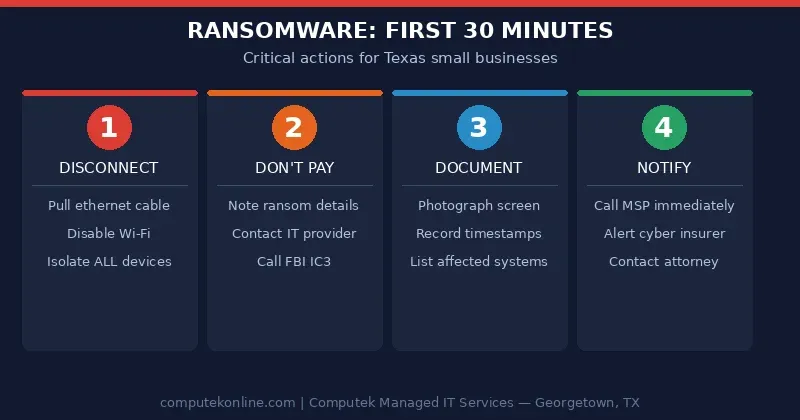
The first thirty minutes after discovering an attack are critical. Here is what you must do immediately.
1. Disconnect Infected Systems from the Network
The single most important first step is isolation. Ransomware spreads laterally: once it has a foothold on one machine, it actively looks for other devices on the same network to infect. Pull the ethernet cable, disable Wi-Fi, and disconnect affected devices from everything: your local network, cloud drives, and any connected systems. Do this for every machine you suspect has been compromised.
Do not shut the machines down. Powering off can destroy volatile memory evidence that investigators use to identify the ransomware variant and trace the attack vector.
2. Do Not Pay the Ransom
Every cybersecurity authority (the FBI, CISA, and experienced incident responders) strongly advises against paying the ransom. There are several reasons:
- Payment does not guarantee you will receive a working decryption key
- Even if your files are restored, attackers often leave backdoors and re-encrypt systems weeks later
- Paying confirms you are willing to pay, making you a repeat target
- Ransomware payments may fund criminal organizations and could have legal implications under certain OFAC sanctions regulations
Businesses that have solid backup systems in place rarely face the agonizing choice of whether to pay. That is exactly why a proactive backup strategy is the most valuable defense any small business can maintain.
3. Preserve Evidence
Before your IT team begins remediation, document everything. Take photographs of ransom notes on screen, note the date and time the attack was discovered, record which systems are affected, and identify any unusual behavior that preceded the attack: unexpected pop-ups, slow systems, strange login activity. This evidence is critical for:
- Law enforcement (report to the FBI’s IC3 at ic3.gov)
- Your cyber insurance claim
- Identifying the attack vector to prevent re-infection
4. Notify the Appropriate Parties
Depending on your industry and the data involved, you may have legal notification obligations. Healthcare businesses must comply with HIPAA breach notification rules. Texas businesses handling personal data of customers may have obligations under Texas data breach laws. Contact your attorney and, if you carry cyber insurance, notify your insurer immediately. Delays in notification can affect coverage.
How Ransomware Gets Into Small Businesses
Understanding the attack vector helps your IT team close the gap and prevent recurrence. The most common entry points for ransomware in small business environments are:
Phishing Emails
The majority of ransomware infections begin with a phishing email: a convincing message that tricks an employee into clicking a malicious link or opening an infected attachment. Modern phishing emails impersonate banks, vendors, shipping companies, and even colleagues.
Weak or Reused Passwords
Remote Desktop Protocol (RDP) brute-force attacks are a leading ransomware vector. If any system in your network uses a weak or previously compromised password, attackers can log in remotely and deploy ransomware directly.
Unpatched Software
Attackers actively scan for systems running outdated software with known vulnerabilities. Operating systems, applications, and firmware that are not regularly updated create open doors. This is one of the most preventable ransomware entry points and one of the clearest arguments for managed IT services.
Malicious Websites and Downloads
Drive-by downloads from compromised websites, cracked software, and malicious browser extensions can silently install ransomware on employee machines without any obvious warning.
Ransomware Recovery Options: Backup Restore vs. Paying the Ransom
When ransomware strikes, businesses face a stark choice that is heavily influenced by one factor: whether reliable, recent, tested backups exist.
Recovery via Backup Restore (The Right Path)
Businesses with a robust backup and disaster recovery plan can restore operations without negotiating with criminals. A strong backup strategy follows the 3-2-1 rule:
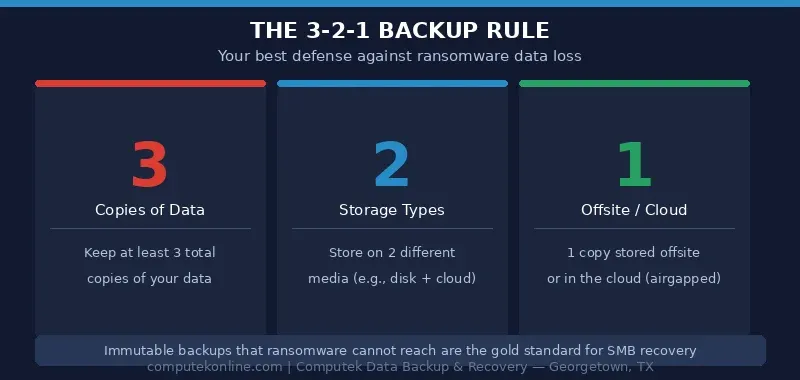
- The 3-2-1 rule: Three copies of data, stored on two different media types, with one copy offsite (or in the cloud)
- Immutable backups: Backups stored in a format that ransomware cannot reach or encrypt
- Regular testing: Backups that have never been tested for restoration are not reliable backups
- Short recovery point objectives: How much data can your business afford to lose? Daily backups mean you could lose a day’s work; hourly incremental backups reduce that window dramatically
With a clean backup available, the recovery process involves isolating and wiping infected machines, rebuilding from known-good backups, closing the attack vector, and restoring operations. A well-prepared business with an MSP partner can often complete this process in hours to a few days rather than weeks.
Not sure if your backups are ransomware-ready? Schedule a free 15-minute call with Computek to assess your current backup infrastructure and close any gaps.
Recovery Without Backups
Without tested backups, options narrow considerably. Some ransomware variants have publicly available decryption tools: the No More Ransom project (nomoreransom.org) is a good first check. Beyond that, businesses are either negotiating with criminals or accepting data loss. This is the scenario that drives businesses to consider paying, and it is the scenario that comprehensive backup services exist to prevent.
The Role of an MSP in Ransomware Recovery
Managed Service Providers exist at the intersection of prevention and response, and their value is never more apparent than in a ransomware crisis. When a Central Texas SMB has an experienced MSP like Computek in their corner, the recovery picture looks very different.
Faster Incident Response
Most SMBs do not have the internal expertise to conduct a proper incident response. An MSP knows your environment: your systems, your network topology, your backup schedule. That means your MSP can move immediately to contain and remediate rather than spending hours figuring out what is even in place.
Pre-Positioned Backups and Recovery Infrastructure
Computek’s data backup and recovery services are designed with ransomware scenarios in mind. Offsite and cloud-based backups mean that even if ransomware encrypts everything on your local network, your data remains recoverable. The goal is to reduce recovery time from weeks to hours.
Proactive Monitoring That Catches Attacks Early
Ransomware does not always strike all at once. Attackers often spend days or weeks inside a network before triggering the encryption payload: conducting reconnaissance, stealing data, and disabling security tools. Proactive managed IT services with 24/7 monitoring can detect anomalous behavior patterns before the attack fully deploys, allowing intervention while the damage is still limited.
Endpoint Security and Ransomware Detection
Modern endpoint security tools include behavior-based ransomware detection that can interrupt an encryption process as it begins, rather than waiting for the damage to be done. Computek deploys enhanced ransomware detection as part of its managed services stack, adding a critical layer of automated defense for client systems.
Ransomware Recovery Checklist for Texas Small Businesses
Use this checklist as a quick reference if ransomware strikes your business:
- ☐ Disconnect: Unplug affected systems from the network immediately; do not power them off
- ☐ Alert your IT team or MSP: Contact Computek (or your IT provider) immediately
- ☐ Do not pay the ransom: Note ransom demand details for law enforcement
- ☐ Document everything: Photograph ransom notes, note affected systems, timestamps
- ☐ Report to law enforcement: File a report with FBI IC3 (ic3.gov)
- ☐ Notify your cyber insurer: Delays can affect coverage
- ☐ Check for backup availability: Identify the most recent clean backup point
- ☐ Identify the attack vector: Work with IT to determine how the ransomware got in
- ☐ Wipe and rebuild infected systems: Never trust a system that was compromised; rebuild from scratch
- ☐ Restore from backups: Verify data integrity before resuming operations
- ☐ Close the vulnerability: Patch the exploited system, reset credentials, update security tools
- ☐ Conduct a post-incident review: Update your incident response plan with lessons learned
How Computek Helps Texas Small Businesses Prevent and Recover from Ransomware
For over 25 years, Computek has been the trusted IT partner for small and mid-sized businesses across Georgetown, Round Rock, Cedar Park, and the surrounding Central Texas region. Founded in 2001 by Kristal Walker with a mission to bring enterprise-grade IT support to growing businesses that cannot afford a full internal IT department, Computek has built its reputation on being proactive: finding and fixing problems before they cause business disruption.
Computek’s approach to ransomware protection is layered and comprehensive:
- Enhanced Ransomware Detection: Behavior-based endpoint tools that interrupt encryption attempts in real time
- 24/7 Proactive Monitoring: Around-the-clock visibility into your network so anomalies are caught before they become catastrophes
- Data Backup and Recovery: Offsite and cloud-based backup solutions with tested restoration procedures, reducing your recovery time objective (RTO) dramatically
- Employee Security Awareness Training: Since most ransomware enters through phishing, training your team is one of the highest-ROI security investments available
- Network Security: Firewalls, email filters, and endpoint security configured to block known ransomware delivery mechanisms
Computek’s cybersecurity services and network security solutions work together to create a defense-in-depth posture that makes it significantly harder for ransomware to reach your data in the first place, and dramatically faster to recover when the unexpected still occurs.
One client put it simply after years of partnership: “For over 10 years, Computek has kept our data completely safe.” That kind of track record is built one proactive decision at a time.
Frequently Asked Questions
Should I pay the ransom if my backups are old or incomplete?
Paying the ransom remains a last resort and is generally not recommended even when backups are imperfect. Before paying, work with your IT provider to explore all options: partial backup recovery, publicly available decryption tools, and data reconstruction from secondary sources. If paying is seriously under consideration, involve legal counsel and your cyber insurer before making any payment.
How long does ransomware recovery take for a small business?
Recovery time varies enormously based on the extent of the infection and the quality of your backup infrastructure. Businesses with tested, recent backups managed by an MSP can often recover critical systems in 24 to 72 hours. Businesses without backups may face weeks of downtime, data reconstruction costs, and potential permanent data loss.
Will cyber insurance cover a ransomware attack?
Many cyber insurance policies cover ransomware-related costs, including incident response, data recovery, business interruption, and sometimes ransom payments (as a last resort). Coverage depends heavily on your specific policy and whether your business was maintaining required security controls at the time of the attack. Review your policy with your insurer or broker now, before an incident occurs.
How do I know if my backups are actually reliable?
The only way to know your backups work is to test them regularly. Many businesses discover too late that their backup system was not running correctly, files were excluded, or the restoration process fails. A managed IT provider should be testing backup restorations on a scheduled basis and providing documentation of successful tests.
Can ransomware be removed without paying or restoring from backup?
In some cases, yes. Certain ransomware variants have been decrypted by security researchers, and free tools are available at nomoreransom.org. However, this is the exception rather than the rule with newer, professionally developed ransomware. Relying on the possibility of a free decryption tool is not a risk management strategy.
Is my Central Texas small business really at risk?
Yes. Ransomware operators do not discriminate by size or location: they target businesses that are accessible and have valuable data. Small businesses in growing Texas markets are increasingly targeted precisely because rapid business growth sometimes outpaces security investment. The question is not whether your business could be targeted, but whether you are prepared if it is.
Don’t Wait for a Ransomware Attack to Take Action
The best time to prepare for a ransomware attack was before it happened. The second best time is right now. Whether your current setup has gaps in backup coverage, outdated security tools, or no formal incident response plan, Computek can help you assess where you stand and build a layered protection strategy that fits your business and your budget.
Computek serves small and mid-sized businesses throughout Georgetown, Round Rock, Cedar Park, Leander, Austin, and all of Central Texas. For 25+ years, we have helped business owners sleep better knowing their data is protected and their systems are monitored, so they can focus on running their business instead of worrying about cyber threats.
Ready to protect your business from ransomware? Schedule a free 15-minute call with our team today and find out what a proactive cybersecurity and backup strategy looks like for your business.