

A construction firm in North Austin cannot afford to wait for files trapped on an office server while crews work across multiple job sites. Cloud services for small business give teams secure access to the data and applications they need, wherever the work happens.
Ready to explore practical cloud options? Schedule a 15-minute call with Computek.
Cloud services for small business provide a way to store data and run software over the internet instead of on local hardware. These tools help firms in Central Texas lower costs by replacing large IT spending with smaller monthly fees. This shift is part of a digital move that helps teams work faster. Experts note that cloud tools help speed up digital changes by replacing large gear costs with smaller running fees. You can access files from a job site in Georgetown or a shop in Round Rock at any time. This setup allows your staff to work well from any place. It also helps you grow your firm quickly as you get more clients.
Many local owners wonder whether these tools fit their exact trade or field office. This guide explains how cloud technology works, when it makes sense, how to plan a migration, and what to expect from a provider.
What are cloud services for small business?
Cloud services for small business deliver software, storage, backups, and computing power over the internet. Rather than maintaining every server and application on-site, a business can select hosted tools that match its needs, scale resources as demand changes, and give authorized employees secure access from the office or field.
Cloud services let your firm use tech tools over the web. Instead of buying big servers for your office, you rent space on fast machines owned by a host. This change is part of what experts call the Fourth Industrial Revolution. In this new era, web tools take the place of old hard gear. For many local shops, this means less mess and fewer tech headaches.
For a small business, the cloud is a smart move. It helps you swap large, one-time costs for small monthly fees. You do not have to pay a huge bill to get your data systems started. Instead, you pay as you go. This keeps your cash flow healthy and lets you grow when you are ready. It also gives you the same power that big firms have for a much lower price.
Why the cloud fits small teams
Small teams need to stay fast to win. Cloud tools help you do this by letting your staff work from any place at any time. You can check files on a phone or a laptop while you are on the road. Being mobile is a big plus for local firms that need to meet clients in the field. Many firms find that the cloud helps them grow and get more work done each day.
These services also make your work more stable. In the past, if a server in your office broke, your whole day stopped. With the cloud, your data stays safe in a secure data center. Most hosts keep your tools running all the time so you never miss a beat. This high level of trust is why most small shops now move their files away from old office servers.
Three main types of cloud tech
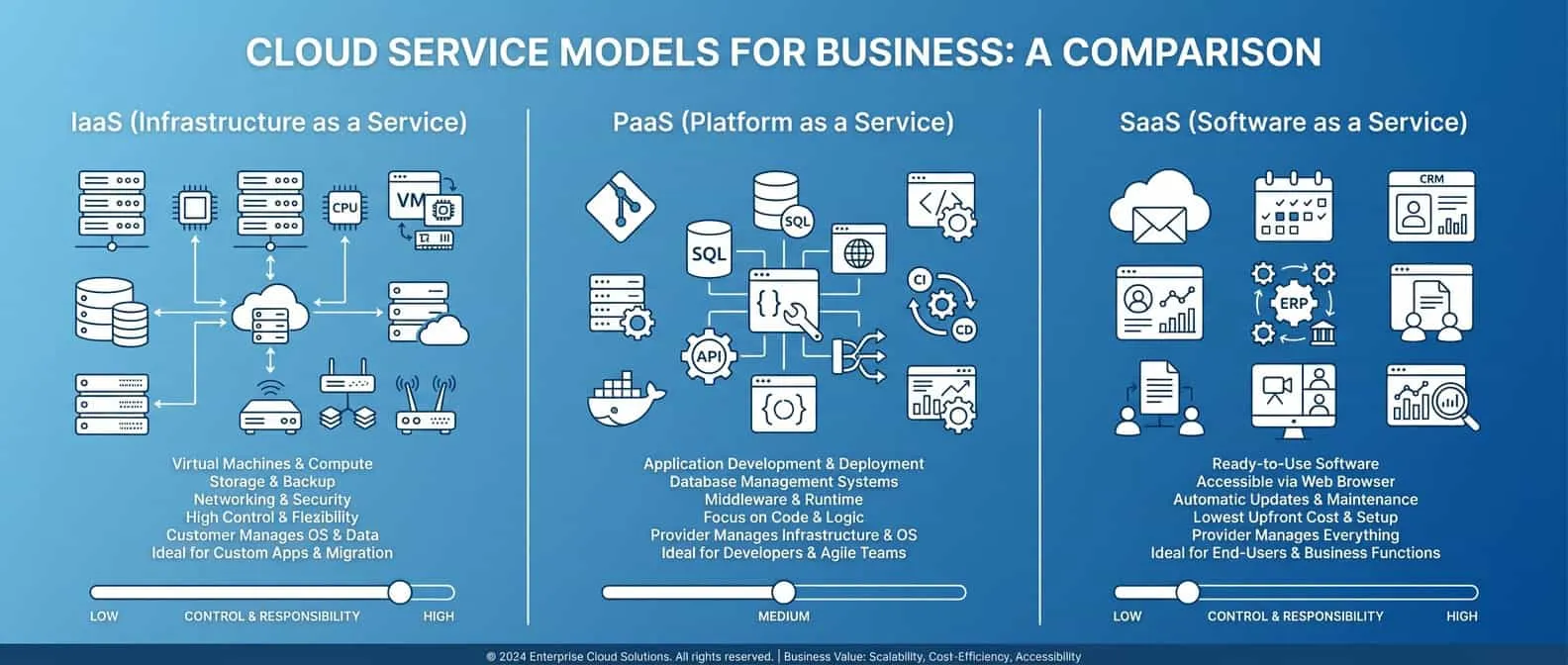
Most people use the cloud every day without knowing it. The most common type is Software as a Service, or SaaS. This includes tools like web-based email, office apps, and chat programs. You just log in through your web browser and start working. There is no need to load discs or run updates on your own. The host does all that hard work for you.
Next is Infrastructure as a Service, or IaaS. This is like renting a virtual server or storage space. It is a key part of managed cloud services for firms that need to host their own apps or large files. IaaS gives you the core parts of a data center without the cost of the hardware. You can add more space or power in minutes if your work grows.
The last type is Platform as a Service, or PaaS. This is mostly for teams that build their own software. It gives them a safe place to write, test, and run code. For the average small shop, SaaS and IaaS are the most useful tools. They help you stay fast and keep your data safe while you focus on your customers.
| Cloud Model | What You Get | Best Use Case |
|---|---|---|
| SaaS | Ready to use apps | Email and office work |
| IaaS | Virtual servers | Hosting and storage |
| PaaS | Tools for coding | Building custom apps |
Picking the right cloud setup
Once you know the types of tools, you must pick a way to host them. Most small firms use a public cloud. This is a large system shared by many users, like a big building. It is cheap and very easy to set up. Hosts like Google or Microsoft handle all the care and safety for you. This lets you use tools that stay up and running all the time.
Some firms need more privacy and use a private cloud. This is a system built just for one company. It costs more but gives you full control over your data. Many businesses find that a hybrid cloud is the best choice. This mix lets you keep private files on your own server while using the public cloud for daily tasks. It gives you the best of both worlds.
Using these services helps your team work in a better way. A recent study found that firms using the cloud can improve their money and social results. You can scale your work fast to meet new goals. With the right setup, your small business can stay strong and lead the way in a web-based world.
For small businesses, cloud services can lower hardware costs, support remote teamwork, scale with demand, and improve resilience when paired with the right security controls.
Computek can connect cloud planning with cloud computing services and IT consulting.
Key benefits of cloud services for small business
The key benefits of cloud services for small business include lower capital costs, easier scaling, stronger collaboration, remote access, and improved resilience. The value depends on selecting services that fit the business, configuring them securely, and managing subscriptions so the company pays only for resources it uses.
Cloud tools are more than just a trend for modern teams. They help small firms do more with less while keeping data safe. Research shows that small firms improve their money and social results when they use cloud tools. These systems allow you to work from any place at any time. This freedom is a big win for firms in Central Texas that want to grow without high costs.
Lower costs and fast growth
One of the best parts of the cloud is how it changes your budget. In the past, you had to buy big servers and gear to start a team. This took a lot of cash up front. Now, you can swap large costs for small monthly fees. You only pay for the storage and power that you use right now. This shift helps you keep more cash on hand for other needs like hiring or sales.
Scaling your firm is also much simpler with the cloud. If you get a new contract or more staff, you do not need to wait for new gear to arrive. You can add more space or tools in just a few minutes. This speed helps you stay ahead of others in your field. It also means you do not waste money on tech you do not need yet. You get a system that fits your exact size today and tomorrow.
Better teamwork and less risk
Cloud systems help your team work together in new ways. When you use managed cloud services, everyone can see the same files at once. There is no need to send copies of a file back and forth by email. This keeps things clear and stops people from using old data. Teams can talk and share ideas in real time from the office or from home. This link makes work move faster and keeps the team happy.
Using cloud tools also helps cut down on simple mistakes. Many firms find that they have fewer office errors when they use smart cloud software. These tools can track data and update logs without a person doing it by hand. This saves hours of work each week and keeps your records right. It also frees up your staff to focus on big tasks that help the firm make more money.
- Get access to your data from any phone or laptop.
- Keep your files safe with high-end tools used by big firms.
- Reduce the heat and power used by on-site servers.
- Speed up the time it takes to get new items to the market.
Support for your specific field
Cloud plans are not one-size-fits-all. You can find options built for fields like making goods, sales, or building. These plans help you see your data fast so you can make smart choices. For a firm in Central Texas, this means you can track your work from the shop floor or the job site. You get the same tech power as a huge firm but at a price that fits your budget.
Trust is another key part of these services. Most cloud firms promise that their systems will stay up and run nearly all the time. If a storm hits or the power goes out at your office, your data stays safe in the cloud. Your team can keep working from a different spot without losing a single file. This strength keeps your business running no matter what happens in the local area.
A business may be ready for the cloud when aging servers, limited remote access, rising maintenance costs, or recurring downtime begin to slow daily work.
Local teams can compare their needs with Computek’s Georgetown IT services and Round Rock IT services.
How do you know your business is ready for the cloud?
A business is usually ready for the cloud when aging servers, limited remote access, rising maintenance costs, or recurring downtime slow daily work. Leaders should also consider whether current systems can support growth, protect important data, and give employees reliable access from the locations where they actually work.
Moving your work to the cloud is a big step. Most small firms reach a point where old tools no longer keep up. You might feel the lag in your daily tasks or worry about data safety. Finding the right time to switch is key to growth. Choosing to move is a choice for the long term. It saves you from the cost of buying new gear every few years.
Signs your current systems are falling behind
Many owners find that their on-site servers feel slow as the team grows. If your staff cannot access files from home or a job site, you are likely ready for a change. High repair costs for old hardware are also a major red flag. Instead of paying for big, one-time tech buys, you can use cloud computing solutions to pay as you go. This shift replaces large costs with small fees. These are easier to track as seen in reports on digital change.
Another sign is a drop in speed. Most firms run faster once they use cloud tools. If it takes too long to launch new products or update your data, your current setup is holding you back. For teams in fields like manufacturing or construction, being able to scale fast is a huge win. You can get more done without the wait of old systems. It also lets you avoid the risk of data loss on local disks.
Key questions for leadership
Before you make the jump, you should talk with your lead team. Ask if your current tools can handle your plans for next year. Do you have a plan for if a server fails? If the answer is no, it is time to look at cloud services for small business to boost your safety. These services help improve the financial health and work of small firms.
You should also check if your team is ready for new tech. Top support from the boss is a key factor for a smooth move. Think about these points:
- Can our team work well from any place?
- Do we have too much downtime with our local server?
- Are we spending too much on IT upkeep?
- Is our data safe from local threats like fires or theft?
Managing the risks of a move
The shift is not just about new tech; it is about how it fits your work. Complexity is often the biggest hurdle for smaller firms. You need to make sure new tools work with your current software. This is where managed cloud services can help guide the way. They ensure your move is smooth and secure. They also help you plan for future growth.
It helps to start small. You do not have to move every file at once. Many firms start with email or file storage. This lets your team get used to the new flow without too much stress. Check your web speed too. Since the cloud runs on the web, a fast link is a must for success. A good plan will help you avoid the most common traps and keep your work on track.
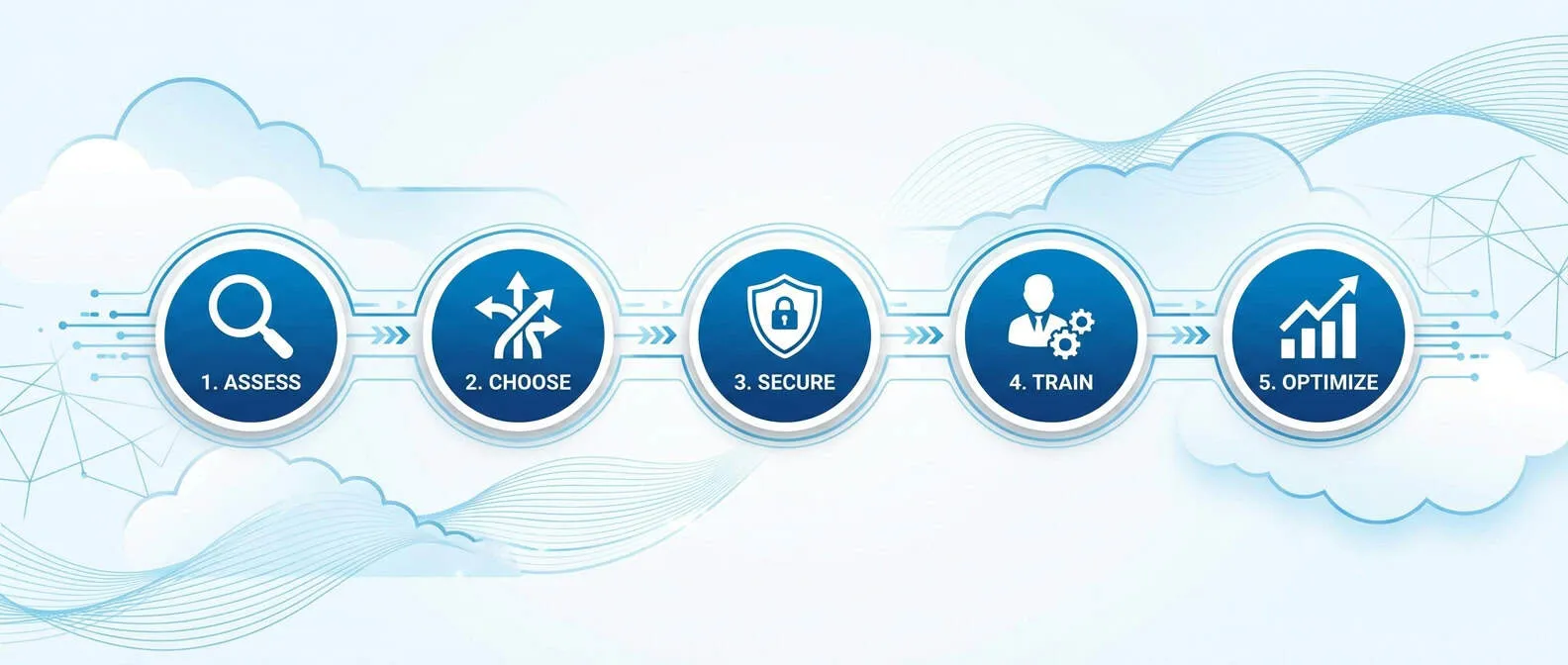
A successful cloud migration starts with an application and data inventory, clear security requirements, a staged move, user testing, and a rollback plan.
Migration planning should also coordinate with data backup and recovery.
How to plan a successful cloud migration
A successful cloud migration begins with an inventory of applications and data, clear business and security requirements, and a staged rollout. Back up critical information, test with a small group, train users, and keep a rollback plan so the business can reduce disruption while verifying that each workload performs as expected.
Moving your data to the cloud is a big step for any local business in Central Texas. It can help you grow and save money on old hardware that breaks often. Many firms find that cloud computing integration makes their money and social work much better. But you must plan well to avoid downtime or lost files. A clear map helps your team move without stress or lost work hours. You want to make sure your staff can keep helping clients while the tech change happens.
Checking your business needs
Before you start, look at what your company needs to run each day. You should find which apps and files are most vital for your daily work. Some small firms use managed cloud services to help with this deep check. It is vital to know how much data you have and who needs to reach it. This audit saves time later and keeps your monthly costs low. You can avoid paying for space that you do not really use.
Complexity is often the main thing that stops small businesses from using the cloud. You want to pick tools that your staff can learn fast without too much training. Switching from old servers to a new cloud setup lets you skip large upfront costs. This shift helps you focus on serving your customers instead of fixing broken server parts. Small teams in North Austin and Round Rock can gain a lot from this smart move. It allows you to compete with larger firms while keeping a local feel.
Keeping your data safe
Security is a top worry for many owners when they move to the cloud. You must set clear rules about who can see and edit your files. Using flexible IT infrastructure lets you set strong guards around your most private data. You should also make sure you have a full backup before you start the move. This safety net keeps your business running even if a file gets lost during the transfer. Good security builds trust with your clients and partners.
Think about how your team will reach their files from home or on the road. The cloud lets your staff stay connected even when they are not in the office. You should also check if the tools you pick can talk to each other. When your apps share data well, you save time and make fewer mistakes. This leads to a smoother workflow for everyone in your company.
The migration process
A good plan breaks the move into small, easy tasks that any team can handle. You do not have to move every single file in one day. Start with low-risk data to see how the system works in the real world. This pilot phase lets you find bugs before they affect your whole shop. Slow and steady steps often lead to the best long-term results.
- Audit your tools and data. Make a full list of every app and file your team uses to stay busy. Find out which ones need to move first and which can stay on-site for now.
- Set clear goals and security rules. Decide what you want to achieve with the move to the cloud. Set up strong passwords and user roles to keep your data safe from the very start.
- Backup all your information. Never start a move without a full copy of your files stored in a safe place. This step keeps your business safe if something goes wrong during the transfer process.
- Run a small pilot test. Move one small team or a single project to the cloud first. Watch for any lag or errors so you can fix them before the main move.
- Move your data in phases. Transfer your files in groups rather than all at once. This reduces the risk of long downtime and keeps your business open for your clients.
- Test everything and train your staff. Check that all links and apps work in the new cloud space. Teach your team how to use the new tools so they can stay productive and happy.
- Improve your new cloud space. Look for ways to save more money and work faster in the cloud. Remove any tools or files you no longer need to keep your bill as low as possible.
Success comes from careful prep and constant testing of your new systems. Many small shops find that the cloud lets them move faster and react to market changes better. By following these steps, you can build a strong base for your tech future. Your business will be more flexible and ready for growth in the years to come. You can feel sure that your data is safe and your team is ready for anything.
Cloud security depends on shared responsibility: providers protect the platform, while businesses manage identities, access, device security, backups, and employee practices.
Review related guidance on cybersecurity services and cyber threat protection.
Cloud security and business continuity considerations
Cloud security follows a shared-responsibility model. The provider protects the underlying platform, while the business manages identities, access, devices, backups, and employee practices. A resilient plan also defines recovery objectives, tests backups, and documents how employees will keep working if an office, connection, or application becomes unavailable.
Moving to the cloud changes how you keep data safe. It is not just about locking a server room anymore. Instead, you and your provider share the work to keep things secure. Many firms use cloud computing solutions to get better tech without a big upfront cost. But you must still manage who can see your files and how they sign in. Setting up managed cloud services helps you track these roles and keep data private.
Protecting your digital assets
Safety in the cloud starts with identity. You should use multi-factor authentication (MFA) for every user. This adds a second check, like a code on a phone, to stop bad actors who guess a password. It is also key to use strong encryption for files while they sit in storage and when they move. Good cloud services for small business give you these tools to help meet rules for privacy and safety.
You must also watch your systems for odd acts. Modern cloud tools can log every time someone opens or shares a file. This creates a list that shows who did what and when. Having these logs makes it easy to find and fix risks before they turn into big leaks. It also helps you stay in line with laws that need proof of data control.
Planning for business uptime
Business continuity means keeping your shop open even if things go wrong. In the cloud, this relies on smart backups and fast recovery plans. You should not just trust that the cloud will always be up. You need a way to get your data back if a file is lost or if a local power cut hits. Automated backups make sure you always have a fresh copy of your work ready to go.
A solid plan also looks at how fast you can get back to work. Some firms find that cloud tools help them run business changes 78% faster than old setups. This speed is vital when you need to fix a system after a crash. By testing your recovery steps now, you make sure your team stays busy no matter what happens to your tech.
A capable cloud services provider should assess business needs, explain costs clearly, plan migration and security, support users, and review the environment as requirements change.
Businesses in specialized fields can review Computek’s experience supporting construction companies and manufacturing teams.
What should you expect from a cloud services provider?
A capable cloud services provider should assess your current environment, explain recommendations and costs in plain language, plan migration and security controls, support users, and review the environment as needs change. Look for a partner that connects technical decisions to uptime, productivity, risk, and the goals of your business.
Choosing a partner for your cloud journey is a big step. For a local shop in Georgetown or a plant in Round Rock, the right choice makes work smooth. You should not just look for a vendor who sells tools. You need a team that knows the local market and your own goals. A good partner will guide you from the first talk to the final setup. They help you use managed cloud services to grow without the stress of tech debt.
A deep look at your needs
Your journey starts with a phase called discovery. In this step, your partner learns how your firm works today. They look at your current apps, data, and how your team talks. This is not just a quick scan. It is a deep dive to find out which parts of your setup are ready for the move. They will help you see which cloud services for small business fit your budget and your speed.
A clear scope of work is also vital. You should know just what the partner will do and what they will not. This prevents shocks later when the bill comes. Good partners will map out every task. They explain how they will move your files and which tools will stay on-site. This plan keeps your project on track and helps you avoid waste.
Planning for the move
Moving to the cloud can be tricky if you do not plan for downtime. Your partner should tell you when systems will be offline. For many firms in North Austin, this happens at night or on weekends to save time. They should have a plan to get you back up fast if something goes wrong. This gives you peace of mind as you make the switch.
Sharing the plan with your staff is just as needed. Your team needs to know how their daily work will change. A top partner helps with this by giving clear info for your staff. They may offer quick guides or short talks to show how the new tools work. This keeps all calm and ready for the new way of doing business.
Ongoing help and clear bills
The work does not stop once your data is in the cloud. You should expect fast support when you have a hitch. Whether you are in Pflugerville or downtown, you need a team that answers the phone. They should watch your systems day and night to stop threats before they cause harm. This care keeps a small firm strong in a digital world.
Cloud costs can change based on how much you use each month. Your partner should meet with you to review your bills. They look for ways to save money by cutting tools you do not use. Per the National Science Foundation, cloud tools help firms trade big upfront costs for small monthly fees. This shift lets you spend your cash on growing your brand instead of buying costly servers.
Last, your partner should help you make the cloud better over time. They suggest new tools that can help your team work faster. As your firm grows, they help you scale up your storage or add new security layers. This view makes sure that your tech stays as sharp as your business goals.
Want a clear migration plan before making changes? Schedule a 15-minute call with Computek.
These answers cover common questions small-business leaders ask about cloud safety, costs, providers, and everyday cloud tools.
Frequently Asked Questions
Small-business leaders often ask whether the cloud is safe, how much it costs, which provider to choose, and which services they already use. The answers depend on business requirements, but security configuration, clear pricing, careful migration planning, and responsive support are essential across nearly every cloud environment.
Is cloud computing safe for small business data?
Cloud tools offer high-end safety that few small firms can afford on their own. These systems use strong codes to hide your files from bad actors. Most hosts also store your data in multiple spots. This means if one server fails, your work stays safe. Cloud tools can help firms keep work secure while improving productivity when configured and managed well. You get the same safety level as a large firm at a much lower cost.
What is the cost of cloud services for small business?
The cost varies based on the tools you need and how much data you store. Most firms use a pay-as-you-go plan to keep costs low. This lets you swap large IT buys for small monthly fees. Strategic cloud use can lead to a 35 percent drop in your tech spending. You only pay for what you use, which keeps your cash flow healthy as your team grows.
How do I choose a cloud provider for my small business?
Start by looking for a host that knows your field. You want a provider that offers high trust and stays up nearly all the time. Check if their tools work well with the software you use now. It is also smart to pick a host that can grow with you. Many firms find that management support is the most vital part of a move. Picking a local partner can help you get the best results.
What are some examples of cloud services for small business?
Common examples include tools for email, file storage, and talk apps. You might use Microsoft 365 or Google Workspace to help your team share docs in real time. For storage, apps like Dropbox or FileCloud let you access files from any spot at any time. These tools replace old server gear with fast web apps. They help you stay mobile and focused on your clients while the host handles the tech care.
Ready to plan your cloud strategy?
The right cloud strategy begins with business goals, not a list of products. A practical assessment should identify which workloads belong in the cloud, which security and recovery controls are required, how users will be supported, and how the organization can measure cost, reliability, and productivity after migration.
A successful move to the cloud starts with a clear understanding of your applications, security requirements, and business goals. Computek helps Central Texas businesses evaluate practical cloud options and plan migrations with less disruption and fewer surprises.
Schedule a 15-minute call to discuss the right next step for your business.