
Cloud Backup and Disaster Recovery for Businesses
We use a system that backs up all of your domain and server information and stores it off site so you’ll always be able to access your data quickly.
From tax records to client information, your data is essential in running your business. When it’s lost because of an unanticipated natural disaster or even worse, it is stolen, you need to make sure you can recover that data so your business can continue to thrive and grow without losing clients.
Data backup and data recovery is the most important service you could ever sign up for, as Computek specializes in computer, data, and hard drive backup, as well as system recovery. We use a unique system that backs up all of your domain and server information and stores it in a dissimilar server off site so you’ll always be able to reaccess your data quickly. Computek’s managed IT services are the perfect compliment for any business in the Georgetown and Austin areas.
Benefits of data backup and disaster recovery services:
Plan for unexpected issues
They happen to everyone, and they can happen at any time. Take preventative measures today.
Safeguard and defend your business
Computek protects your data, network, and systems from hacking or virus threats so you can focus on more important issues.
Quick recovery
If disaster strikes and data is lost, we’ll have it back for you as quickly as possible, minimizing downtime.
Regardless of your business size, you need dependable data backup and recovery in Georgetown and Austin. Computek can provide that to you – call today and prevent the unexpected from ruining your company.
What Is Data Backup and Recovery?
Data backup and recovery is the process of creating copies of business data and storing them in a secure, separate location so the data can be restored quickly if the original is lost, corrupted, or compromised. For businesses in Georgetown and Austin, data backup and recovery services protect against data loss from hardware failures, ransomware attacks, natural disasters, accidental deletion, and theft. A proper backup strategy includes automated daily backups, off-site or cloud storage, and a tested disaster recovery plan that minimizes downtime.
How Does Business Data Backup Work?
- Automated backup scheduling – Your data is copied automatically on a daily or real-time basis
- Off-site storage – Backup copies are stored on a separate server in a different physical location
- Encryption – All backup data is encrypted during transfer and at rest
- Monitoring and verification – Backup integrity is checked regularly to confirm data is recoverable
- Rapid restoration – When disaster strikes, data is restored quickly to minimize business downtime
Why Every Business Needs a Disaster Recovery Plan
A disaster recovery plan outlines exactly how your business will restore data and resume operations after a data loss event. Without a plan, the average business experiences 21 days of downtime after a major data loss, and 60% of small businesses that lose their data shut down within 6 months. Computek’s disaster recovery services ensure your Georgetown or Austin business can recover quickly from any scenario, including ransomware attacks, server failures, and natural disasters.
How often should a business back up its data?
Businesses should back up data at least once daily. For companies handling high volumes of transactions or sensitive data, real-time or hourly backups are recommended. Computek provides automated backup solutions that run continuously in the background, ensuring your Georgetown or Austin business never loses more than a few hours of data in a worst-case scenario.
What is the difference between data backup and disaster recovery?
Data backup is the process of copying and storing data in a secondary location. Disaster recovery is the broader plan for restoring your entire IT environment, including servers, applications, and network connections, after a major incident. Backup is one component of disaster recovery. A complete disaster recovery plan also includes recovery time objectives, communication protocols, and testing procedures to ensure your business can resume operations quickly.
How long does data recovery take after a disaster?
With a proper disaster recovery plan from Computek, most businesses can restore critical data and resume operations within hours, not days. The exact recovery time depends on the amount of data, type of disaster, and your recovery infrastructure. Without a plan, recovery can take days or weeks, and some data may be permanently lost. Computek helps businesses in Georgetown and Austin build recovery solutions that minimize downtime.
What types of data does Computek back up for businesses?
Computek backs up all critical business data including files, databases, email, server configurations, domain information, and application data. Our backup system copies your entire domain and server environment and stores it on a dissimilar server off-site, so you can quickly recover everything from individual files to your complete IT infrastructure.
What is a business continuity plan, and does Computek help create one?
A business continuity plan outlines how your business will continue operating during and after a major disruption, such as a natural disaster, cyberattack, or equipment failure. Computek helps Georgetown and Austin businesses develop comprehensive continuity plans that include data backup strategies, recovery procedures, communication protocols, and testing schedules to minimize downtime.
Can Computek recover data after a ransomware attack?
Yes. Computek’s data backup and disaster recovery services are designed to restore your data quickly after a ransomware attack without paying the ransom. Because we store backups on dissimilar servers off-site, your clean data remains accessible even if your primary systems are compromised. Our recovery process gets your business operational again as fast as possible.
Where does Computek store backup data?
Computek stores backup data on secure, off-site servers that are physically separate from your primary business location. This dissimilar server approach ensures that even if your office experiences a disaster, fire, flood, or theft, your data remains safe and recoverable. All backup data is encrypted both in transit and at rest for maximum security.
Cloud Backup and Disaster Recovery for Businesses
Your business data is the foundation of everything you do. Customer records, financial documents, project files, email archives, and operational databases represent years of work and millions of dollars in value. Losing that data, whether through ransomware, hardware failure, human error, or natural disaster, can shut down operations and threaten your company's survival.
This guide explains how data backup and recovery works for small businesses, the strategies that provide real protection, and what it takes to build a recovery plan that actually works when disaster strikes. If you run a business in Central Texas and have not stress-tested your backup strategy recently, this is the resource to start with. We cover everything from backup fundamentals to disaster recovery planning so you can make informed decisions about protecting your most valuable asset.
Why Data Backup Matters More Than You Think
Data loss is not a hypothetical risk. It is a statistical certainty over a long enough timeline. Hard drives fail. Employees accidentally delete critical files. Ransomware encrypts entire servers. Storms knock out power. Every one of these scenarios has happened to businesses in Georgetown, Round Rock, and Austin.
The statistics tell the story:
- 60 percent of small businesses that lose their data shut down within six months
- 93 percent of companies without disaster recovery plans that experience a major data disaster are out of business within one year
- Ransomware attacks on small businesses increased by over 150 percent in recent years, with average recovery costs exceeding $100,000
- Human error accounts for approximately 30 percent of all data loss incidents
The cost of losing data goes far beyond the data itself. It includes downtime while you attempt recovery, lost revenue during that downtime, the expense of recreating lost work, potential regulatory penalties, and the erosion of customer trust that comes from admitting you lost their information.
A proper backup and disaster recovery strategy is not an expense. It is insurance against the one event that could end your business.
Understanding the 3-2-1 Backup Rule
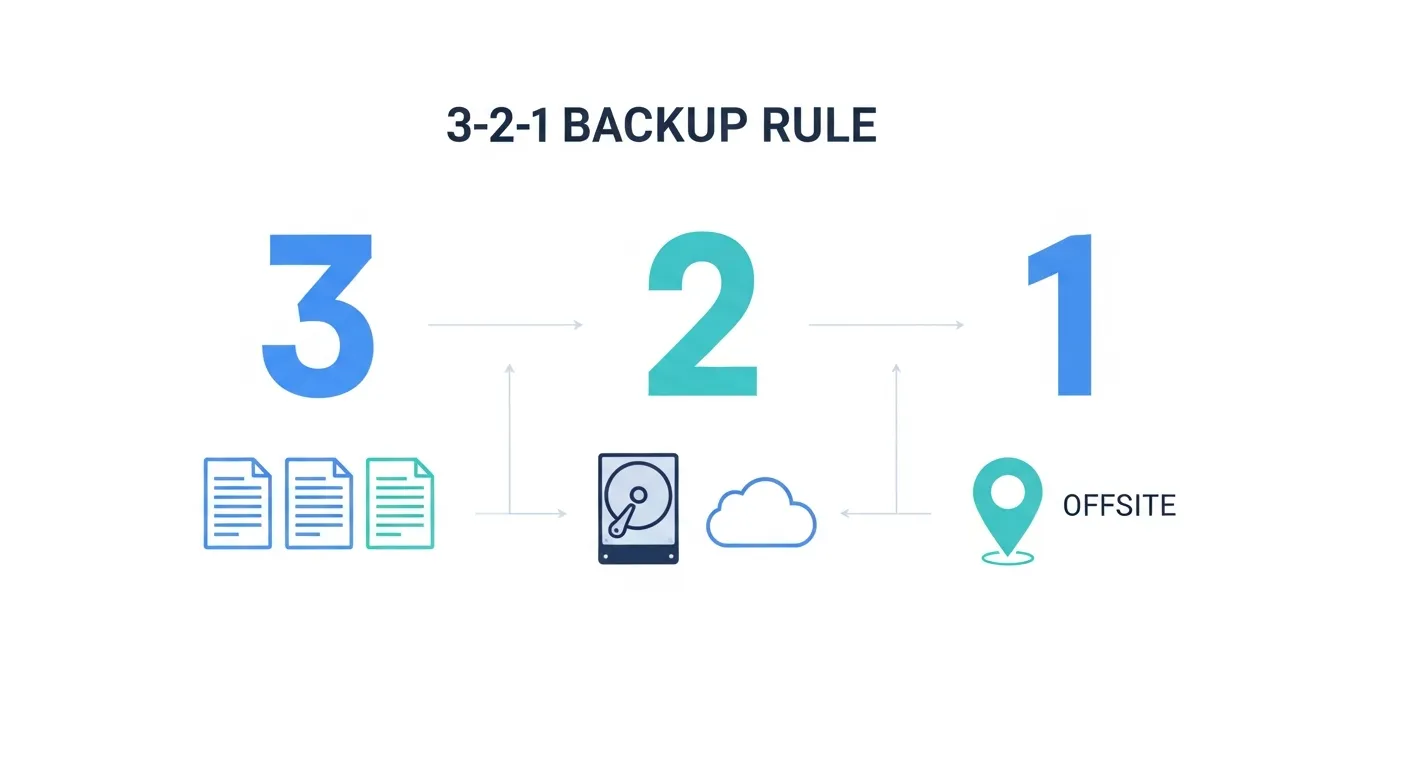
The 3-2-1 rule is the gold standard for data backup strategy. It is simple, effective, and the foundation of every enterprise backup plan:
- 3 copies of your data at all times: the original plus two backups
- 2 different storage types such as local drives and cloud storage, so a single hardware failure does not eliminate all copies
- 1 copy stored offsite in a geographically separate location, protecting against physical disasters like fires, floods, or theft
Many small businesses think they have backups because they use one external hard drive or a single cloud service. That is one copy on one medium in one location. It fails the 3-2-1 test completely, and it means a single point of failure can destroy all your data.
Modern implementations of the 3-2-1 rule often add two more considerations: keeping at least one copy offline or immutable so ransomware cannot encrypt it, and verifying through regular testing that backups can actually be restored.
Types of Data Backup for Small Businesses
Not all backups are created equal. Understanding the different backup types helps you design a strategy that balances protection, speed, and storage efficiency.
Full Backups
A full backup copies every file in your system. It provides the simplest and fastest recovery because all your data exists in one complete backup set. The downside is that full backups consume the most storage space and take the longest to complete.
Most businesses run full backups weekly or monthly, supplemented by incremental or differential backups on a daily basis.
Incremental Backups
Incremental backups copy only the files that changed since the last backup of any type. They are fast to create and use minimal storage. Recovery requires the last full backup plus every incremental backup since then, which makes the recovery process slower and more complex.
Differential Backups
Differential backups copy everything that changed since the last full backup. They are larger than incremental backups but make recovery simpler because you only need the last full backup plus the most recent differential. This approach offers a practical middle ground between full and incremental strategies.
Cloud Backup
Cloud backup transmits your data to secure offsite servers maintained by a cloud provider. It satisfies the offsite requirement of the 3-2-1 rule automatically and provides access to your backups from any location. Cloud backup services typically include encryption, versioning, and automated scheduling.
Image-Based Backup
Image-based backup captures your entire system state, including the operating system, applications, settings, and data. This enables bare-metal recovery, meaning you can restore a completely failed server to its exact previous state on new hardware. For businesses that cannot afford extended downtime, image-based backup is essential.
Hybrid Backup
A hybrid backup strategy combines local and cloud backup to deliver both speed and security. Local backups on a network-attached storage device or dedicated backup server provide fast recovery for everyday incidents like accidental file deletion or single-server failures. Cloud backups provide offsite protection against major disasters like fires, floods, or ransomware. This combined approach satisfies all elements of the 3-2-1 rule and is the architecture most managed IT providers recommend for small businesses.
For businesses evaluating their overall IT budget, hybrid backup provides the best value by balancing recovery speed with the lower storage costs of cloud-based offsite copies.
Disaster Recovery vs. Data Backup
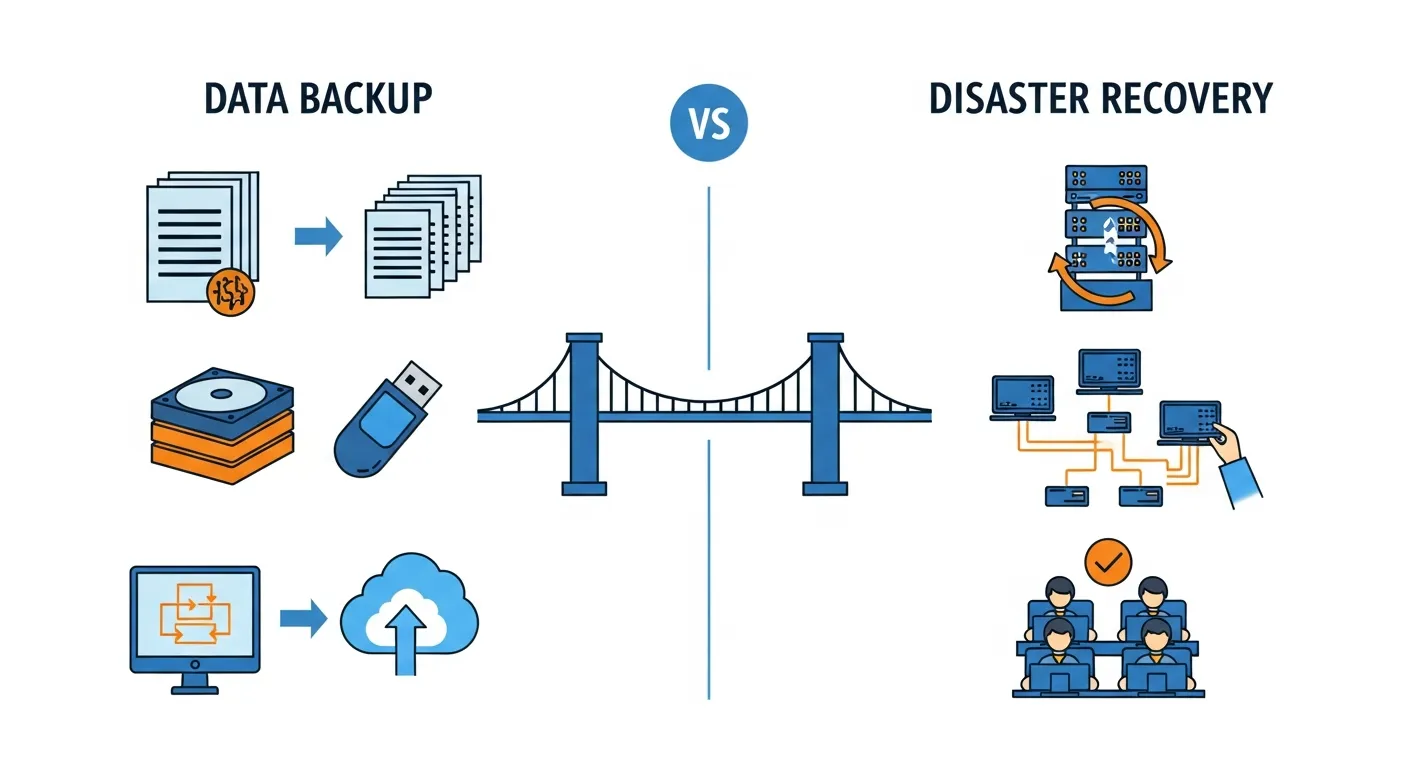
Data backup and disaster recovery are related but distinct concepts. Understanding the difference is critical for building a complete protection strategy.
Data backup is the process of copying your data to a secondary location so it can be restored if the original is lost. Backup answers the question: "Can we get our data back?"
Disaster recovery is the broader plan for restoring your entire IT environment, including servers, applications, network configurations, and user access, after a major disruption. Disaster recovery answers the question: "How quickly can we get back to work?"
A business with good backups but no disaster recovery plan can restore its data but may still face days or weeks of downtime while rebuilding servers and reconfiguring systems. A complete disaster recovery plan includes:
- Recovery Time Objective (RTO): The maximum acceptable time to restore operations. For most small businesses, the target is 4 to 24 hours depending on the criticality of each system.
- Recovery Point Objective (RPO): The maximum acceptable amount of data loss measured in time. An RPO of one hour means you can afford to lose no more than one hour of work.
For a deeper understanding of these metrics and how to set them for your business, read our guide on RTO vs RPO explained.
Planning the right RTO and RPO for each of your systems requires understanding which applications are mission-critical and which can tolerate longer outages. Your IT consulting partner can help you conduct a business impact analysis that maps each system to its appropriate recovery targets.
Building a Business Continuity Plan
Business continuity planning extends beyond IT disaster recovery to address how your entire organization continues operating during a disruption. While disaster recovery focuses on restoring technology, business continuity covers:
- Communication protocols so employees, customers, and vendors know what is happening and what to expect
- Alternative work arrangements such as remote work capabilities if your office is inaccessible
- Manual workarounds for critical processes when technology is temporarily unavailable
- Supply chain contingencies for maintaining operations when vendors or partners are affected
- Financial reserves to cover expenses during an extended recovery period
For a detailed framework on building your recovery plan, see our guide on disaster recovery planning for small business.
Every business continuity plan should be documented, tested at least annually, and updated whenever significant changes occur in your business or technology environment. The businesses that recover fastest from disruptions are the ones that practiced their response before they needed it. A plan sitting in a binder on a shelf that nobody has read will not help you when a server catches fire at 3 AM on a Saturday.
Common Causes of Data Loss
Understanding what puts your data at risk helps you prioritize your protection strategy:
- Hardware failure remains the leading cause of data loss. Hard drives have a finite lifespan, and even enterprise-grade equipment fails. Server failures, storage array malfunctions, and controller errors can strike without warning.
- Ransomware and cyberattacks encrypt or destroy your data and demand payment for recovery. Modern ransomware variants specifically target backup systems to eliminate your recovery options. Strong cybersecurity protections reduce this risk but cannot eliminate it entirely.
- Human error including accidental deletion, overwriting files, misconfiguring systems, or improperly handling storage media accounts for a significant portion of data loss.
- Natural disasters such as floods, storms, fires, and power surges can destroy on-premise equipment. Central Texas businesses face particular risks from severe weather events.
- Software corruption from failed updates, buggy applications, or database errors can render data unreadable or unusable.
- Theft of laptops, external drives, or even entire servers puts unencrypted data at risk. Physical security and device encryption are essential complements to your backup strategy.
The common thread across all these causes is that they are not a matter of "if" but "when." Every business will eventually experience at least one of these scenarios. The only variable is whether you have a working backup and recovery plan in place when it happens.
How to Choose a Backup and Disaster Recovery Provider
Most small businesses lack the expertise and infrastructure to manage backup and disaster recovery internally. Partnering with a managed service provider ensures your data is protected by professionals who monitor, test, and maintain your backup systems continuously.
Here is what to evaluate:
1. Automated and monitored backups. Your provider should configure backups to run automatically on a schedule and monitor every backup job for success. Failed backups should trigger immediate alerts and remediation.
2. Regular recovery testing. Backups that have never been tested are not backups. They are assumptions. Your provider should test restores regularly and document the results.
3. Ransomware-resistant backup architecture. Your backup system should include immutable or air-gapped copies that ransomware cannot reach. If an attacker encrypts your primary systems and your backups, you have nothing.
4. Clear RTO and RPO commitments. Your provider should define specific recovery time and recovery point objectives for each of your critical systems, then prove they can meet them.
5. Local and cloud storage. A hybrid approach with both local backups for fast recovery and cloud backups for offsite protection gives you the best of both worlds.
6. Encryption and security. Your backup data should be encrypted both in transit and at rest. Access to backup systems should require strong authentication.
7. Integration with your broader IT strategy. Backup and disaster recovery work best when integrated with your managed IT services and cloud infrastructure.
Why Central Texas Businesses Choose Computek for Data Backup
Computek has implemented backup and disaster recovery solutions for small and medium-sized businesses across Georgetown, Round Rock, Cedar Park, and North Austin since 2001. Our approach goes beyond simply copying files. We build recovery strategies that keep your business running.
Here is what sets Computek apart:
- Complete backup and DR solutions. Automated local and cloud backups, image-based recovery, ransomware-resistant architecture, and documented recovery procedures.
- Regular testing with documented results. We do not just set up backups and hope they work. We test restores regularly and provide evidence that your data is recoverable.
- Part of a complete IT strategy. Backup integrates with our managed IT services, cybersecurity, cloud services, and VoIP solutions.
- Named technicians who know your systems. When disaster strikes, you need immediate help from people who already understand your infrastructure.
- 25+ years of proven reliability. Over two decades of protecting Central Texas business data through every type of disaster scenario.
"Computek is amazing. We brought them on board during an extreme growth period and they listened to my needs and delivered beyond my expectations." — Louis K., Accounting Manager, Glen Una Management
Frequently Asked Questions
What is the 3-2-1 backup rule?
The 3-2-1 rule is the gold standard for data backup. It requires maintaining three copies of your data, stored on two different types of media, with one copy located offsite. This ensures that no single point of failure, whether hardware malfunction, ransomware, or physical disaster, can destroy all copies of your data.
How often should a small business back up its data?
Most small businesses should run daily backups at minimum. For businesses that process high volumes of transactions or create significant amounts of new data daily, more frequent backups (every few hours or continuous replication) may be appropriate. The right frequency depends on your Recovery Point Objective, the maximum amount of data loss your business can tolerate.
What is the difference between data backup and disaster recovery?
Data backup copies your files to a secondary location for restoration if the originals are lost. Disaster recovery is a broader plan that covers restoring your entire IT environment, including servers, applications, and configurations, after a major disruption. Backup ensures you can recover data; disaster recovery ensures you can resume business operations.
How much does business data backup cost?
Backup costs depend on the volume of data, frequency of backups, storage location (local vs cloud), and level of disaster recovery included. Cloud backup services for small businesses typically range from $100 to $500 per month. Comprehensive backup and disaster recovery solutions with defined RTOs and RPOs range from $300 to $1,500 per month depending on your infrastructure complexity.
Can ransomware attack my backups?
Yes. Modern ransomware variants specifically seek out and encrypt backup files, especially those stored on network-attached drives or mapped cloud storage. This is why immutable backups and air-gapped copies are essential. Immutable backups cannot be modified or deleted for a defined retention period, even by an attacker with administrative access.
What is RTO and RPO?
RTO (Recovery Time Objective) is the maximum acceptable time to restore operations after a disaster. RPO (Recovery Point Objective) is the maximum acceptable amount of data loss measured in time. If your RPO is four hours, your backup strategy must ensure you never lose more than four hours of work. These metrics guide your backup frequency and disaster recovery architecture.
How do I know if my current backups are working?
The only way to verify your backups work is to test them by performing actual restores. A backup that has never been restored is an unverified assumption. Your IT provider should test restores regularly, at least quarterly, and document the results including the time it took to restore and the completeness of the recovered data.